

The following is a step-by-step guide on how to create a database in XAMPP, complete with screenshots to help you get started. But, before we get into how to make one, let's define what a database is!
What are databases?
A database is a collection of data that is stored in a systematic manner on your device or computer. Certain application programs or software can be used to process or manipulate the data.
The goal is to be able to generate useful information later on. There are several database specifications, including the data type, data structure, and various limitations on the data you want to store.
This database is also an essential component of an information system. Why? Because the database can serve as a repository for important data that will be processed again for future purposes.
Databases also have the ability to organize all existing data, identify if there is duplicate data, and most importantly, prevent the formation of relationships between unhelpful data, such as data that is not "connected" and complicated updates.
Next, you will learn how to create a database in XAMPP. Check out the following explanation for more!
How to Create a Database with XAMPP
There are several steps you must follow to create a database with XAMPP. Here are the five steps:
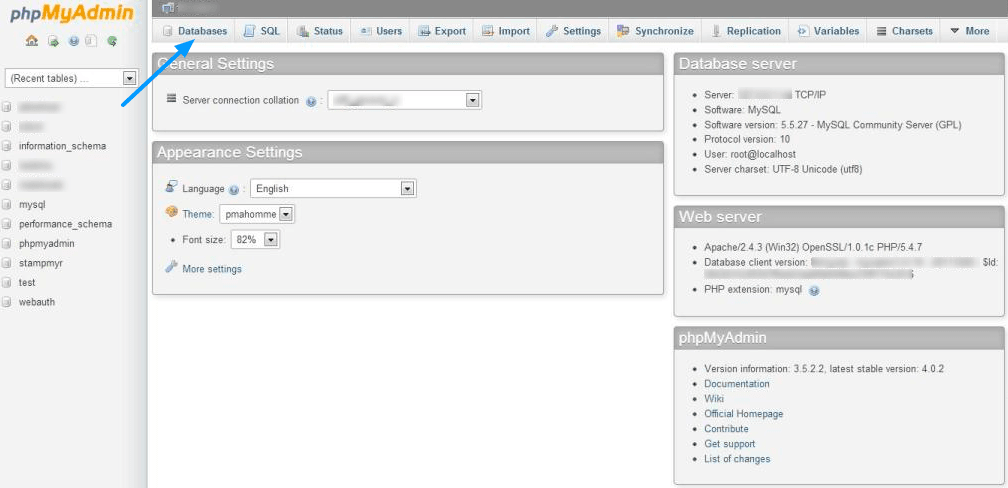
- The first thing you should do is login to phpmyadmin XAMPP. Please type in your browser field the following address: localhost/phpmyadmin. Then your screen will display the PHPMyAdmin dashboard.
- Then try clicking the "Database" menu. If you have, you try to enter the name of the database you want (free). After that, you click "Create" in the lower right corner of the Database menu box earlier. Take note of the name of the database you entered, because it will be used again in the future.
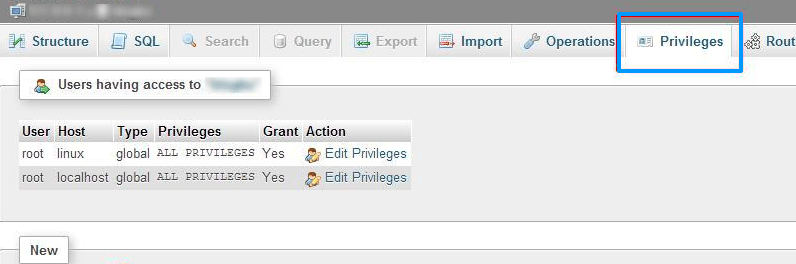
- The next step is to add a user name to the database that you previously created (step number 2). Go to that database (you can find it on the left side of the screen). After you log in, look at the menu and click "Privileges", then click "Add user" as shown in the following image.
- After you click "Add User" earlier, a form to create a new user will appear on the screen. Try to fill it with another name (free) and memorize the name again for later use. If so, don't forget to fill in the "Host" column.
Please enter "localhost" in the "use text field" field for the host. The password must then be entered twice (fill in the same password). Finally, scroll down to the bottom of the box and select the "grant all database privileges" option, as shown in the image below.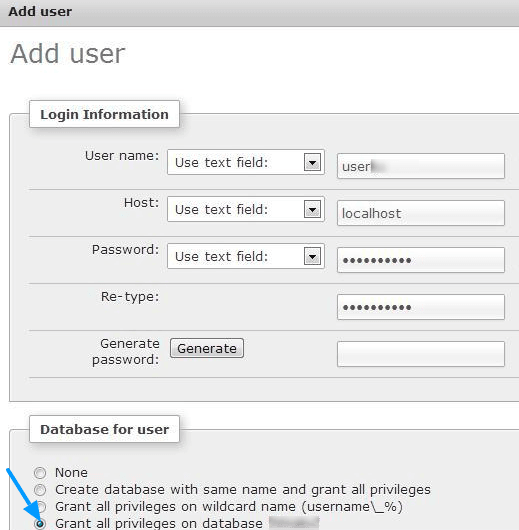
- Do not stop there. Please scroll/scroll to the bottom. You can see that there is a "Global Privileges" option. This option is useful for giving access rights to the user to manage all existing databases. So, just click "Check All". Then, you click "Add User" again. At this point, you have successfully created a database.
Various other database applications
In addition to the XAMPP application, there are actually many other database applications that you can use. Most of these types of databases are classified as Relational Database Management System (RDBMS) databases:
MySQL
The MySQL database is a database processing application. This database processor is free and open source. Oracle is now working on the MySQL database. Sun and MySQL AB previously created MySQL.
This database processing program has become the world's most popular database application. The MySQL database is free to users, which may account for its popularity. This MySQL database is reportedly used by Facebook as well.
SQLite
An SQLite database is a program used to process very small databases. This is the same application as MySQL; it is open source by definition. Richard Hipp created the SQLite database.
SQLite databases are now widely used by programmers and developers, who primarily use them to create Android-based applications.
Microsoft SQL SERVER/MSSQL
The Microsoft SQL SERVER/MSSQL database is a database processing application developed under the auspices of the big name Microsoft. This Microsoft SQL SERVER/MSSQL application is indeed classified as commercial, with quite expensive rates. But, actually, Microsoft also provides a version of Freware which is limited to a limited number of users.
Oracle
Oracle Database is a database processing application that is really for business and commercial purposes. Oracle was developed by Oracle Corp., which already has several product variants in the developer market that are well known.
Oracle databases are mostly used by large companies. Naturally, because the quality is quite good and the price is very expensive.
PostgreSQL
The PostgreSQL database is a database processing application that is also open source, like MySQL. You can use this data processing application on various common operating systems such as Windows, Linux, and FreeBSD.
IBM DB2
The IBM DB2 Database is a database processing application developed under the big name IBM. IBM DB2 is not intended for the commercial interests of developers. DB2 is divided into 3 types. One, DB2 for Linux, Unix, and Windows. Two, DB2 for z/OS (mainframe). Three, DB2 for iSeries (OS/400).
MongoDB
MongoDB is a database processor that is similar to MySQL. It is free and open source. 10Gen is the creator of MOngoDB. This single database processor is available for a variety of operating systems, and MogoDB has previously been used by a number of well-known sites and platforms, including Foursquare and MTV Networks.
Microsoft Access
If you have Microsoft Office installed, the Microsoft Access database is the default database processor. This Microsoft Access database is also widely used for novice programmers and developers' learning.
This is due to the program's ease of understanding and use. And, indeed, this Microsoft database has some limitations when compared to other similar database applications.

Post a Comment
Post a Comment